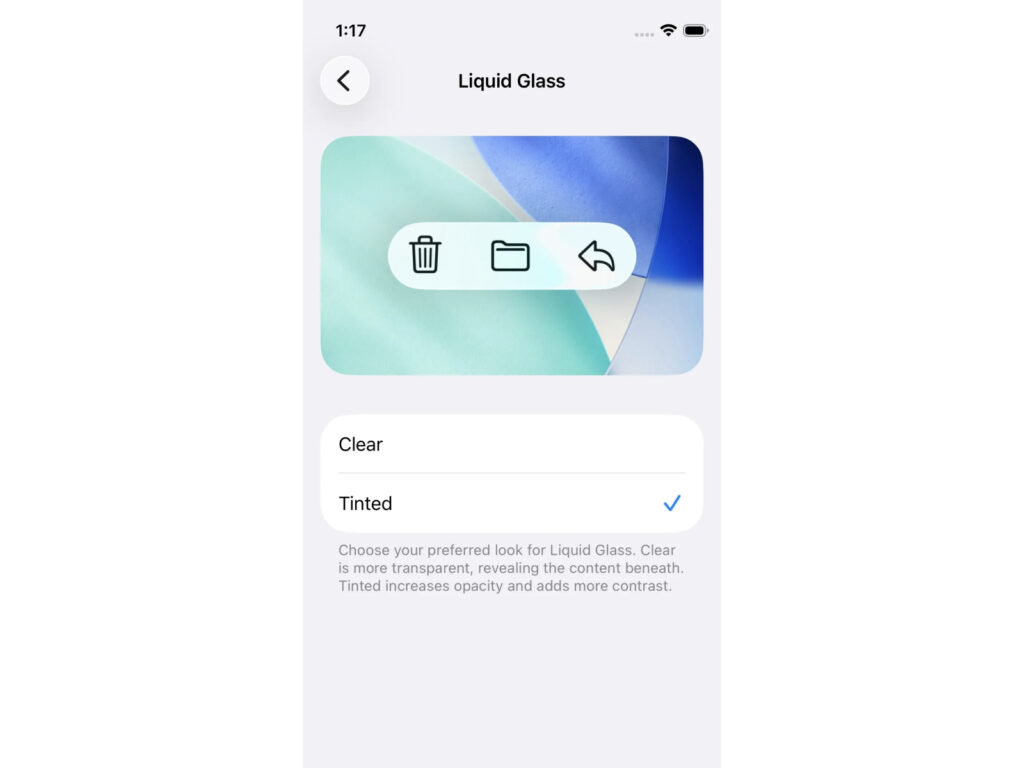
Apple has introduced new settings in the fourth beta of iOS 26.1, iPadOS 26.1, and macOS 26.1 that allow users to directly adjust the appearance of "Liquid Glass." This update responds to feedback from some users during the beta testing period last summer that the transparency was too high, making it difficult to read.
Users can now choose between two options in Settings: "Clear" and "Tinted." "Clear" is the traditional liquid glass design, transparent enough to allow the background behind buttons and menus to show through. "Tinted," on the other hand, increases the opacity to enhance contrast, making on-screen elements more distinct.
Currently available only in beta, the feature can be found in Settings > Display & Brightness > Liquid Glass on iPhone and iPad, and in System Preferences > Appearance on macOS. Apple says this change gives users more visual customization control, while also redesigning the interface to maintain consistency and accessibility across the OS.
Liquid Glass, the new UI style unveiled at this year's WWDC, is considered the biggest change since Apple's transition to "flat design" in 2013. However, the transparent hierarchy has been a source of discomfort for some users. While some have complained that excessive background transparency in areas like the Notification Center and Music app makes text difficult to read, others have also responded positively, praising the subtle reflections and depth as a refreshing departure from the new generation of iOS design.