Figma AI compares images generated by multiple models on a single screen
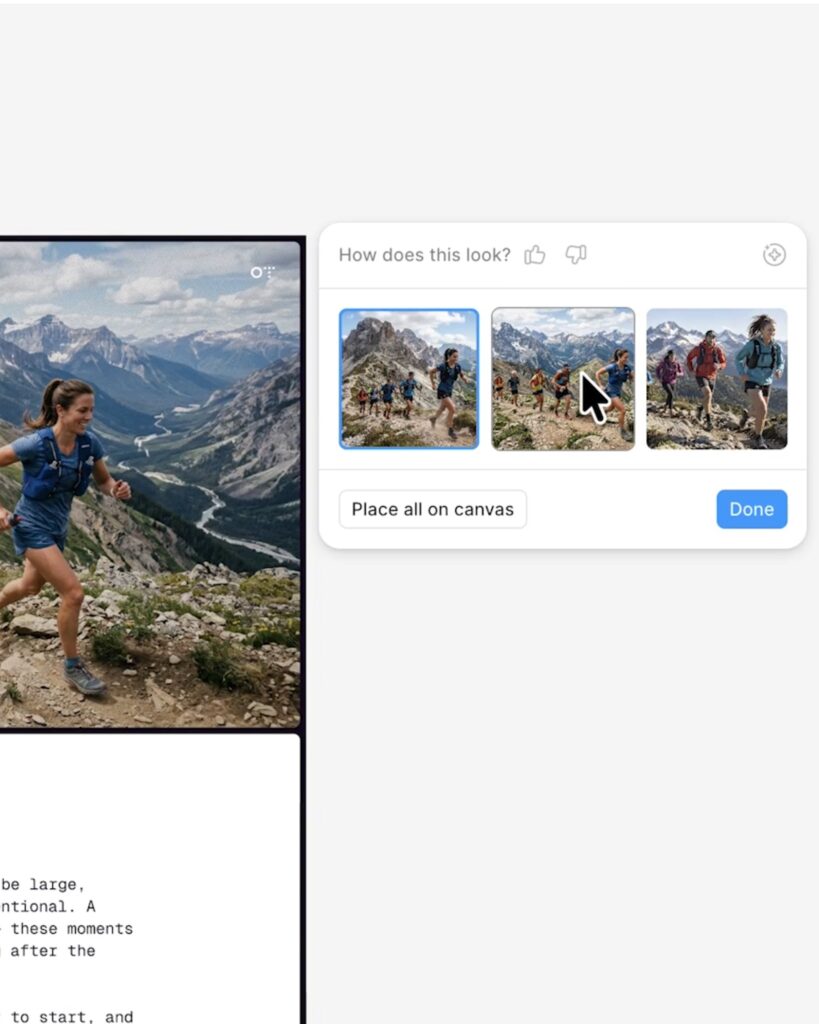
Figma has added the ability to create and compare multiple results at once to its AI image generation and editing tools. With the update released on November 18, you can generate multiple drafts from a single prompt or view results from different models on the same canvas.
There are two generation methods. For a single model, you can choose between 2, 4, or 6 images. When comparing models, you can select up to 3 together, and each model generates one image using the same prompt.
You can add comparison targets by pressing the plus button next to another model on the model selection screen. The official credit guide lists GPT Image 2.5 Sunburst, NanoBanana 2 Lite, and NanoBanana 2 as image generation and editing models. You can also include reference images that explain the desired direction.
The process of selecting a result is linked to the screen you are currently working on. When filling an existing layer with an image, hovering your mouse over a candidate allows you to preview how it would look applied to that area. Clicking 'Place all on canvas' places all candidates on the canvas for comparison.
You can create various results using 'Make image' to create a new image and 'Edit image' to modify an existing image into text. In addition to images already created, images inserted by the user into a file are also eligible for editing.
The AI Image Tool is available on all plans but requires file editing permissions. On the Starter plan, it is available only in Figma Design. Usage is deducted from credits shared with other Figma AI features and depends on the selected model and the number of images generated.
From freelancer to head of design at a unicorn startup, I've been creating impact through brand and product design for over 18 years. Currently, as CEO and editor-in-chief of Design Compass, I research design that drives business impact.