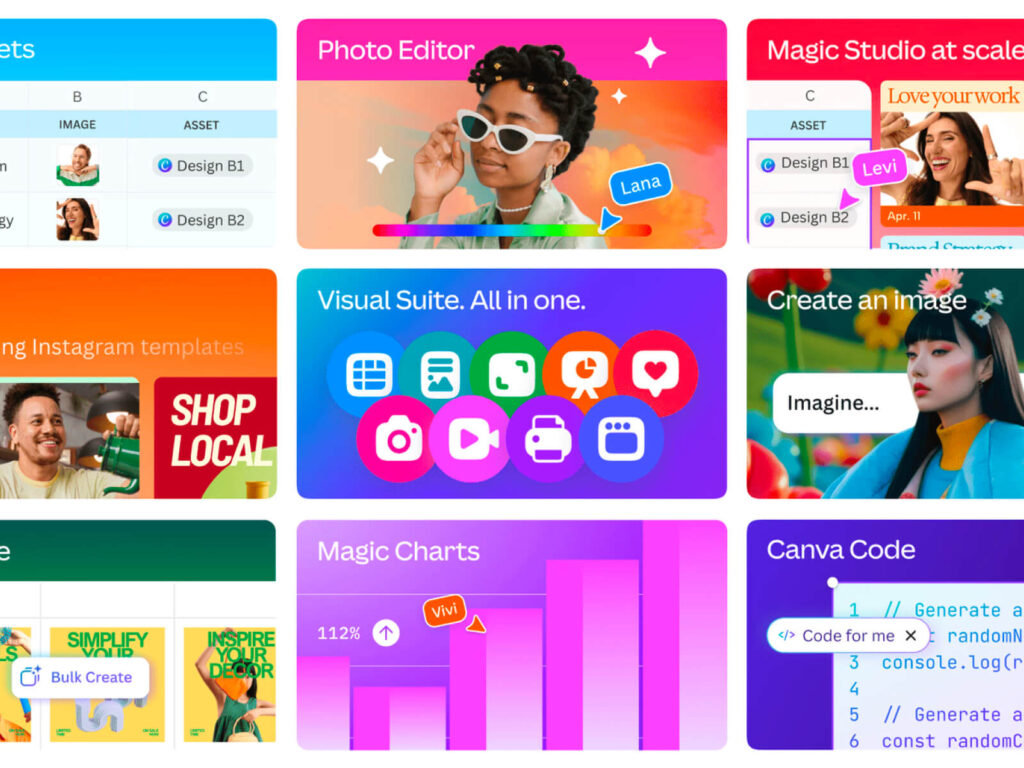
The biggest change is the revamped interface of the 'Visual Suite'. Previously, you could only create individual types of projects, such as slides, websites, and posters, but now you can expand to various media types within a single document. You can automatically derive slides, social content, print designs, etc. while writing a document, and AI assists with this to increase work efficiency.
Team collaboration features have also been enhanced. Instead of having to search for files, you can simultaneously review and edit strategy documents, marketing materials, design drafts, etc. on a single screen, and you can also collaborate in real time. “It’s an experience that integrates creation and consumption, context and communication in one space,” said co-founder Melanie Perkins. “It allows various departments and roles to collaborate on a single page.”
Another key feature of this update is Canva Sheets. This is a full-fledged data management tool that goes beyond the simple table function of existing ones, and provides AI-based sheet functions that are like a combination of Excel and Notion. Users can create data simply by natural language commands such as “organize a list of restaurants and addresses in the Milwaukee area with food type emojis,” and can import data from various platforms such as HubSpot, Statista, Snowflake, and Google Analytics. Data visualization, ROI analysis, and multilingual content creation functions are also provided.
The most experimental effort is Canva Code, which allows users to create interactive content using commands like “Make a multiplication quiz with lots of dinosaurs.” It starts with basic functions like map visualizations, calculators, and quizzes, and can be expanded to more complex functions that can be embedded directly into design projects or published to the web. “It allows us to move from static content to dynamic content,” Perkins said, explaining that it’s central to Canva’s long-term strategy.