Google is significantly enhancing the user-generated video experience with five new video editing features in the Google Photos app. The new features range from automating highlight reel creation to adding music and text overlays, and are rolling out sequentially to Android and iOS.

The most notable change is the template-based highlight video feature. Users simply select a highlight video from the Create tab and select photos and videos. Google Photos automatically creates a video based on the template, complete with built-in music, text, and cutouts. This highlights the ability for even novice users to quickly create a shareable video.
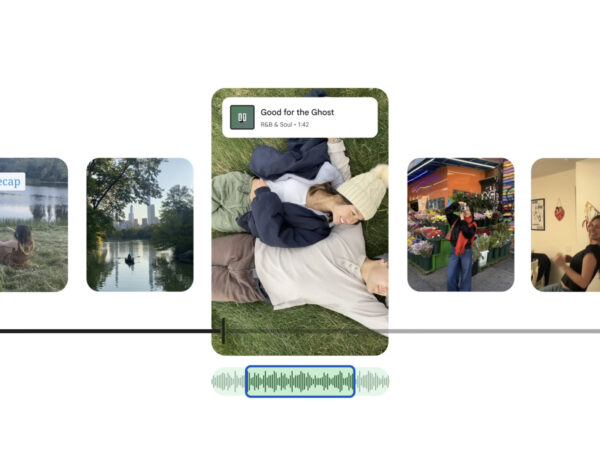
The video editor itself has been redesigned. The new editor boasts significant improvements in speed and usability, and features a unified timeline that supports multi-clip editing and an adaptive canvas that supports various aspect ratios. The tools you need are intuitively placed, reducing the time spent searching for elements and allowing you to focus on the creative process.
Music features have also been expanded. Users can browse Google Photos' music library to select a soundtrack that captures their desired mood or emotion. This can be applied directly from the mobile app, helping to enhance the quality of your videos.
The text overlay feature has also been improved. On Android, you can add text over videos using a variety of fonts, colors, and backgrounds. This feature is considered to enhance user storytelling and clearly convey the context of the video.
Single-clip editing capabilities have also been expanded. The new editor is now the default on Android, allowing you to open videos directly from the Gallery, add music and text, or quickly perform simple edits. It also provides a useful workflow for creating short, single-clip videos.
Google has stated that this update is either already available or is being rolled out sequentially. This is interpreted as a further strengthening of Google Photos' strategy to provide users with a simple video creation experience, continuing the trend of expanding beyond a photo management app into a personal creative tool.